-

北京天演融智软件有限公司
主营:matlab,stata,spsspro,pscad,gams,nvivo,cyme,gms,mathematica
北京天演融智软件有限公司
主营:matlab,stata,spsspro,pscad,gams,nvivo,cyme,gms,mathematica 4
4
科学软件网专注提供科研软件。截止目前,共代理千余款,软件涵盖各个学科。除了软件,科学软件网还提供课程,包含34款软件,66门课程。热门软件有:spss,stata,gams,sas,minitab,matlab,mathematica,lingo,hydrus,gms,pscad,mplus,tableau,eviews,nvivo,gtap,sequncher,simca等等。
The GrapherTM program is furnished under a license agreement. The Grapher software, user’s guide, and quick start guide may be used or copied only in accordance with the terms of the agreement. It is against the law to copy the software, user’s guide, or quick start guide on any medium except as specifically allowed in the license agreement. Contents are subject to change without notice. Grapher is a registered trademark of Golden Software, LLC. All other trademarks are the property of their respective owners.
The right section displays the dimensions of the selected object. Customizing the Quick Access Toolbar The Quick Access Toolbar is a customizable toolbar. One method that can be used to add commands to the Quick Access Toolbar is to right-click on the command in the ribbon and click Add to Quick Access Toolbar. The command is automatically added to the end of the Quick Access Toolbar. To customize the commands and their locations on the Quick Access Toolbar, right-click the ribbon and click Customize Quick Access Toolbar.
Worksheet Manager The Worksheet Manager contains a view of all data loaded into Grapher. Multiple data files are displayed in a tabbed format. By default, the Worksheet Managerappears at the right of theGrapherwindow. Right-click inside the Worksheet Manager to open the worksheet menu commands. These commands are named similarly to the commands on the ribbon. Use the Home | New Graph commands to create a graph in the current plot window. Use the Data Toolsmenu commands to transform, sort, or generate statistics for the worksheet data.
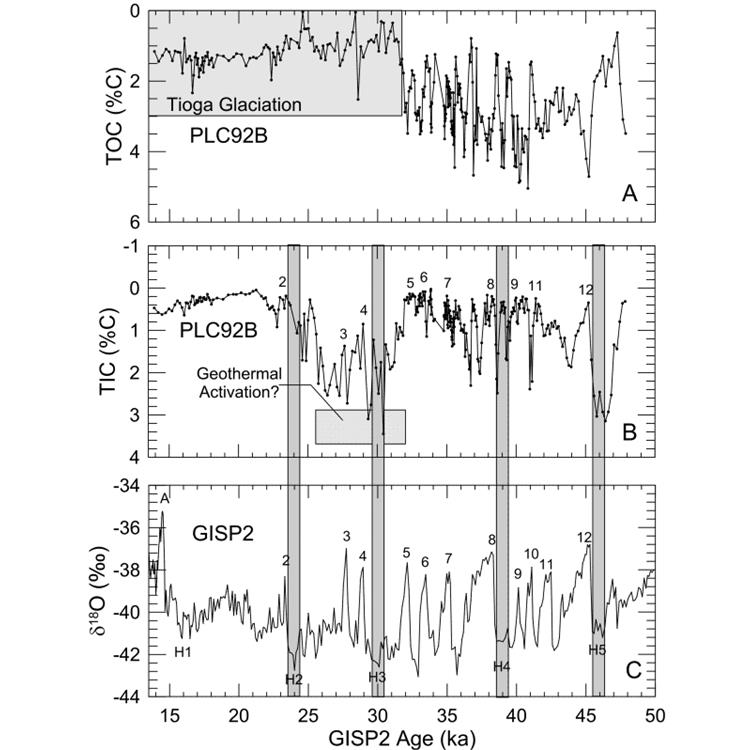
Grapher is a full-featured scientific graphing package, allowing the user to import data in many formats, create and combine a wide variety of 2- and 3-D plot types, and customize the plots in infinite detail.
科学软件网为全国大多数高校提供过产品或服务,销售和售后团队,确保您售后**!2020年,北京天演融智软件有限公司申请高等教育司产学合作协同育人项目,“大数据”和“机器学习”师资培训项目,以及基于OBE的教考分离改革与教学评测项目已获得批准。我们将会跟更多的高校合作,产学融合协同育人


